 MobAI
Download
MobAI
Download
Your cloud agent can build mobile apps too.
Claude Code on the web, Codex cloud and Cursor background agents run on Linux. With MobAI they can preview the app, build it for iOS, run it on a simulator and send it to TestFlight. Claude Code and Cursor can also use your real iPhone. No Mac on your desk.
curl -fsSL https://mobai.run/cloud/install.sh | shSee the app while the agent builds it
SwiftUI, React Native and Flutter render in a phone-sized preview right in the sandbox. The agent reads the screen as a semantic tree, taps and types by label. Flutter and React Native hot reload after each edit, and SwiftUI rebuilds in a few seconds.
mobai-dev preview runNo Mac, simulator or phone needed for the preview.
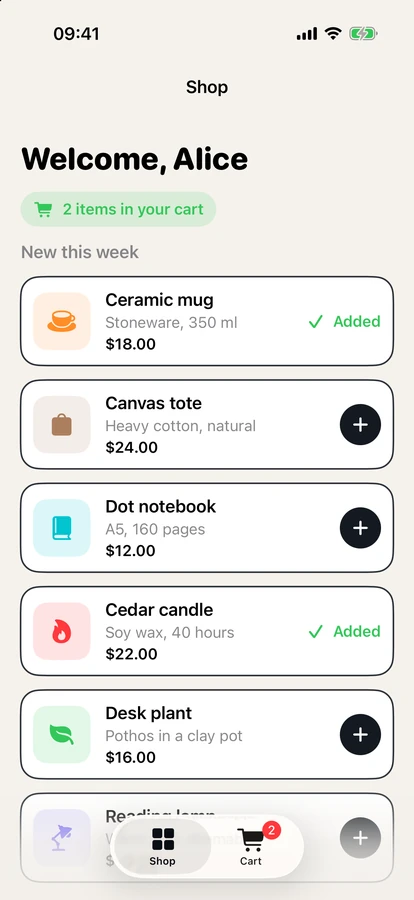
Start the MobAI preview, sign in, add the ceramic mug and the cedar candle and show me the shop screen.
Preview is up. Signing in and adding the mug and the candle next.
Ran 4 commands
Signed in as Alice. Adding the ceramic mug and the cedar candle.
Done. Both items show Added, and the shop shows 2 items in your cart.
The MobAI preview is still running if you want to keep driving it.
Test real behavior without the real world
Mock location, permissions, the camera, network responses and the signed-in user. Walk through loading, empty, error and permission-denied states without wiring up a backend.
Build on the CI you already have
The agent sends the working tree, uncommitted changes included, to GitHub Actions, Codemagic or Bitrise and gets the build back. Builds are free in MobAI and use your provider's minutes.
A real simulator, driven from the cloud
Boot an iOS simulator on a CI runner and let the agent use the app on it. Free with a MobAI account.
The simulator runs on your own GitHub Actions, Codemagic or Bitrise runner and shows up in the MobAI app, where you can watch and take over.
mobai-dev sim startNow start an iOS simulator on GitHub Actions with mobai-dev sim start, sign in, buy the ceramic mug and show me the confirmation.
Ran 1 command
Simulator is online. Starting the bridge and driving sign-in, add to cart and checkout.
Explored 3 files, ran 4 commands
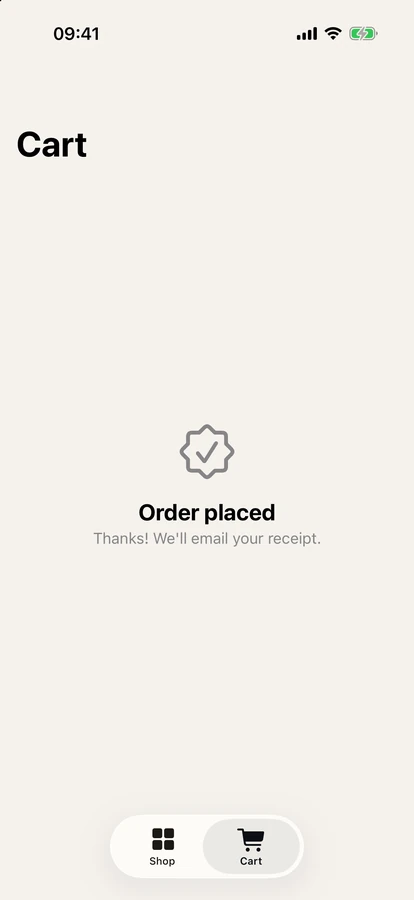
Simulator is up on GitHub Actions. Signed in as [email protected], added the Ceramic mug and checked out.
The cart shows Order placed: Thanks! We'll email your receipt.
Use the iPhone on your desk
Connect your own iPhone over Tailscale and let Claude Code or Cursor install and use the app on real hardware.
- Free: one 60-minute session a day
- Pro: sessions up to 4 hours, with no daily cap
Your Mac can stay off: the agent reaches the phone directly over your tailnet. Set the phone up once in the desktop app, with a cable.
Now build the app for iOS, install it on my iPhone and open it. Use Apple ID signing.
I'll build with Apple ID signing, install on your iPhone, then launch the app on the device.
Explored 3 files, ran 3 commands
Phone is online. Monitoring the build and starting the device bridge.
Signed successfully. Installing on the phone and launching Shelf.
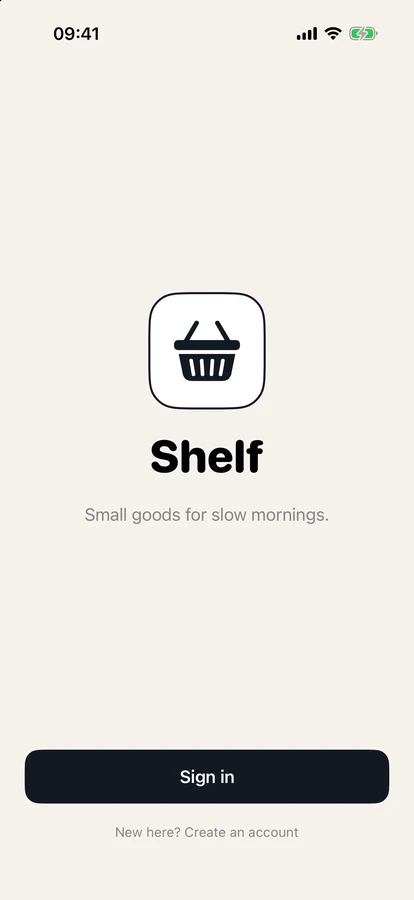
Shelf is running on your iPhone and shows the welcome screen with Sign in.
From a working build to TestFlight
Install the build on your phone with an over-the-air link. When it's ready, MobAI signs it, uploads it and adds it to TestFlight or submits it for review through the App Store Connect API. The build engine underneath is our open-source ios-builder (★1k).
The App Store listing (description, screenshots, pricing) stays in your hands.