 MobAI
Download
Ask for a change. See it on a phone. Ship it.
Apps is where your iOS and Android app lives in MobAI. Tell Claude Code, Codex, Cursor, Grok or OpenCode what you want. It makes the change, runs the app on a simulator or your phone and checks the result. When it works, send the build to TestFlight or Google Play.
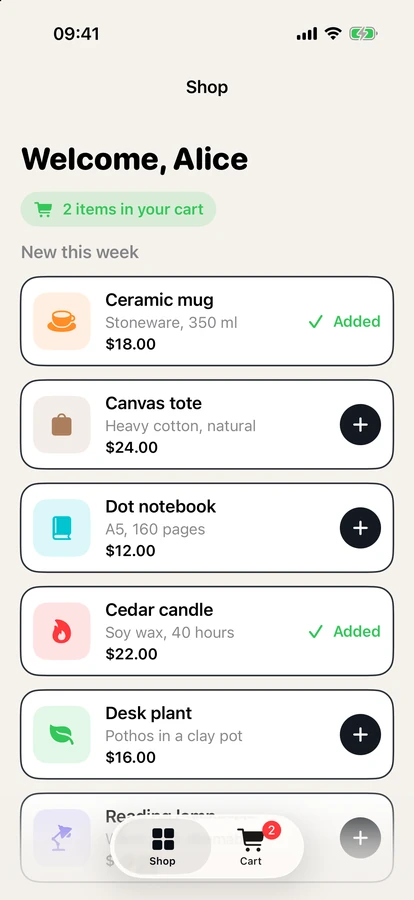
After a tap, the Add button should say Added. Try it on the simulator.
Edited ProductRow.swift
Changed the button. Building and running Shelf on the iPhone 17 simulator.
Ran the app, tapped 2 items
Both the ceramic mug and the cedar candle now say Added, and the cart shows 2 items.
All your apps in one place
Bring an app you have, or start a new one. MobAI works out the framework, writes the build commands and adds skills to the folder, so any agent you open there knows how to build, run and test the app.
Point it at your project
Flutter, React Native, Expo, an Xcode project or an Android Gradle project. A monorepo works too.
Clone from GitHub
Connect your GitHub account and pick a repository. MobAI clones it and sets it up.
Start from nothing
A new Expo, Flutter, SwiftUI or Kotlin app, ready to run. Put it on GitHub when you want to, private by default.
One button to try it on a phone
Pick a simulator, an emulator, your iPhone or your Android phone and press play. MobAI builds the app and runs it. Flutter and React Native apps open with hot reload, so the next change shows up in a second.
The agent sees the same device beside the chat. Give it the phones you want it to use, watch what it does and take over at any time.
- iPhone simulators and Android emulators. MobAI starts one when none is running
- Your iPhone
- Your Android phone over USB
- An iPhone simulator on GitHub Actions, when you have no Mac
iPhone apps from Windows or Linux
Without a Mac, iPhone builds run on GitHub Actions in your own repository. MobAI adds the workflow, signs the build for your iPhone and installs it. Your agent tries each change on an iPhone simulator running there, with hot reload for Flutter and React Native.
On a Mac with Xcode, everything builds on your computer.
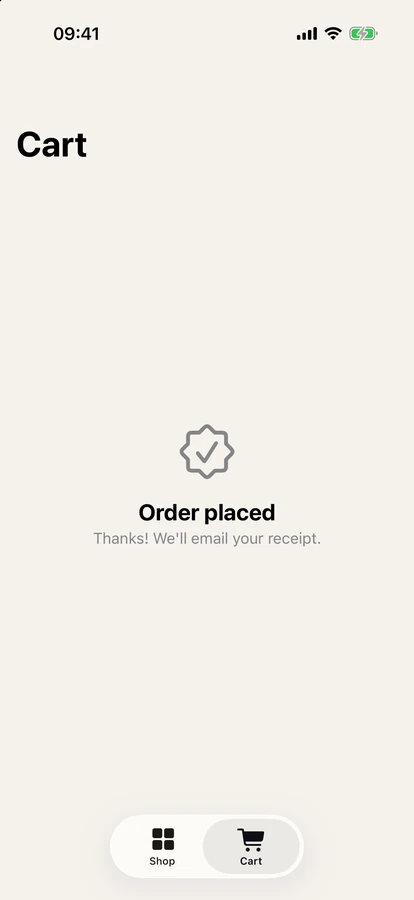
Check that checkout still works on iPhone.
Starting an iPhone simulator on GitHub for Shelf.
Started the simulator, ran 3 steps
Signed in as [email protected], added the ceramic mug and checked out.
The cart shows Order placed. Checkout works.
Get it to your testers
Build on your computer or on GitHub, then send it out.
Upload to TestFlight
MobAI signs the app, builds it and uploads it.
Upload to Google Play
MobAI builds a signed App Bundle and sends it to the track you pick.
Share a build
Send a build to your team. They install it from their own MobAI.
Tests on every pull request
Set up CI once and your MobAI tests run on GitHub for every pull request. The results show up on the app's page.
Your agent tests the PR
Hand a pull request to your agent. It builds the branch, tries the change on a device and tells you what it found.
FAQ
Do I need a Mac?
No. Apps works on macOS, Windows and Linux. Without a Mac, iPhone builds run on GitHub Actions in your own repository, and your agent tries each change on an iPhone simulator there. Android builds always run on your computer.
Which agents can I use?
Claude Code, Codex, Cursor, Grok Build and OpenCode. MobAI starts the one you pick with your own account. It never installs an agent for you. For one you don't have, it links to its install page.
Which frameworks work?
Flutter, React Native, Expo, native iOS with Xcode and native Android with Gradle. Hot reload works for Flutter and React Native on simulators, emulators and phones.
Does my code leave my computer?
Your apps and their builds stay on your computer. MobAI keeps no copy of your code on its servers. GitHub builds run in your own repository on your own Actions minutes, and your agent sends what it needs to its own provider.
How much does it cost?
Apps is part of MobAI Pro, $9.99 a month or $99 a year. You can try all of Pro for 7 days, no credit card needed. See pricing.