With MobAI, Claude Code, Codex, Cursor or any coding agent runs your iOS and Android app while it writes the code. It checks every change on simulators and real phones, turns those checks into tests and runs them in CI. On your machine or in the cloud.
devicesUse the appSimulators · real phones · farms
testingTest frameworkWorkflows · .mob · Maestro
ciAny CImobai-ci · GitHub Actions
cloudCloud agentsLinux sandbox · TestFlight
works with
Works with the agent you already use
Claude Code, Codex, Cursor, OpenCode, Cline or the agent built into MobAI.
Claude Code
Codex
Cursor
OpenCode
Cline
local
On your machine
Install the desktop app for macOS, Windows or Linux. MCP is built in, and MobAI connects Claude Code, Codex, Cursor and others for you.
cloud
In the cloud
Your agent runs in Claude Code on the web, Codex cloud or Cursor background agents? It can still preview the app, build for iOS and ship to TestFlight. From Claude Code or Cursor it can also use your iPhone. No Mac on your desk.
It taps, types and reads the screen on simulators and real phones, then checks its own changes before you do.
It reads the UI tree, takes screenshots and streams device logs, so it sees the same screen you do. It works with Claude Code, Codex, Cursor or the agent built into MobAI.
Test on a real iPhone from macOS, Windows or Linux. No Mac required.
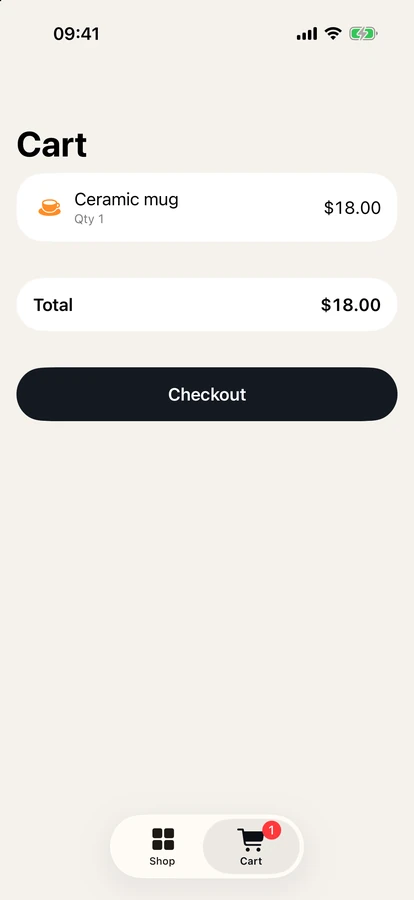
Claude Codev2.1.289~/Projects/shelf› add an item to the cart and check the total
● Using the local iPhone 17 Pro simulator. Let me launch the app and see where it is.
Called mobai
● Need to sign in first (any email works). Signing in, adding the Ceramic mug ($18), and opening the cart.
Called mobai
● Mug added. Now opening the Cart tab.
Called mobai
● I added one item to the cart and the total is correct: $18.00.
* Baked for 45s · done 8:26 AM
02testing
A full testing framework
Plain-text Workflows and precise .mob scripts. Agents write the tests, run them and fix them when the UI changes. The dashboard keeps your runs.
Already on Maestro? Most YAML flows run without changes, even on a real iPhone.
Agent control, tests and mobai-ci work free on one device, no account needed. Pro adds more devices at once, device farms, longer iPhone sessions from the cloud, joining failed CI runs and the team dashboard for $9.99 a month.
 MobAI
Download
MobAI
Download